Best Practices
This document outlines the guidelines that we, as Under the Oaks, have set for ourselves to follow when working on the project. This includes coding, documentation, and working with Git.
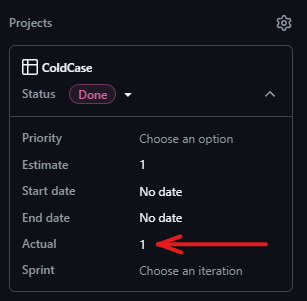
Story duration - Actual
After completing each issue, it is mandatory to note the time spent on it. Use the "Actual" field of the issue itself. The time you spend working on the issue is rounded up to the next full hour; for example, 1 hour and 20 minutes is recorded as 2 hours.
Working on an issue
New branch
If an issue requires changes to the repository, you must create a new branch for it. Such a branch is called a feature or bug branch, depending on the type of issue.
This can be done from the issue (see image below), which links the new branch to the issue automatically. Alternatively, this can be done manually by clicking on the cog icon next to the "Development" Section of the issue.

Naming convention for feature branch
The feature branch should be named as follows: "NR-issue-name-in-kebap-case".
Bsp.: 9-update-feature-branch-naming-convention
Commenting your Implementation
Annotate your classes and methods with JavaDoc.
Classes
Short description of the class, what it is supposed to do and what dependencies it has.
Bsp.:
Methods
Use the @param, @throws and the @returns JavaDoc annotations.
Bsp.:
Testing your Implementation
Before creating your PR, you should always write new tests or update existing ones for your code changes. Code Coverage has to be above 80% for files you changed!
To create an overview of the different logical paths in your implementation, you should always document the edge cases to test in the JavaDoc of the method.
Coding best practices
If you work with IntelliJ IDEA, regularly press
Strg + Alt + Lto reformat your file.
Commit Messages
The commit message should follow this format: "NR short summary of your changes." Example: "9 changed naming convention to kebab case for issue branches."
Pushing to development
After completing the issue:
Create and resolve a pull request from the development branch to your feature branch (this prevents merge conflicts on development).
Create a pull-request from development branch to main branch
2 or more coworkers have to approve the pull-request
Merge the pull-request
Pushing to main
Create a pull-request from development branch to main branch
2 or more coworkers have to approve the pull-request
Merge the pull-request